

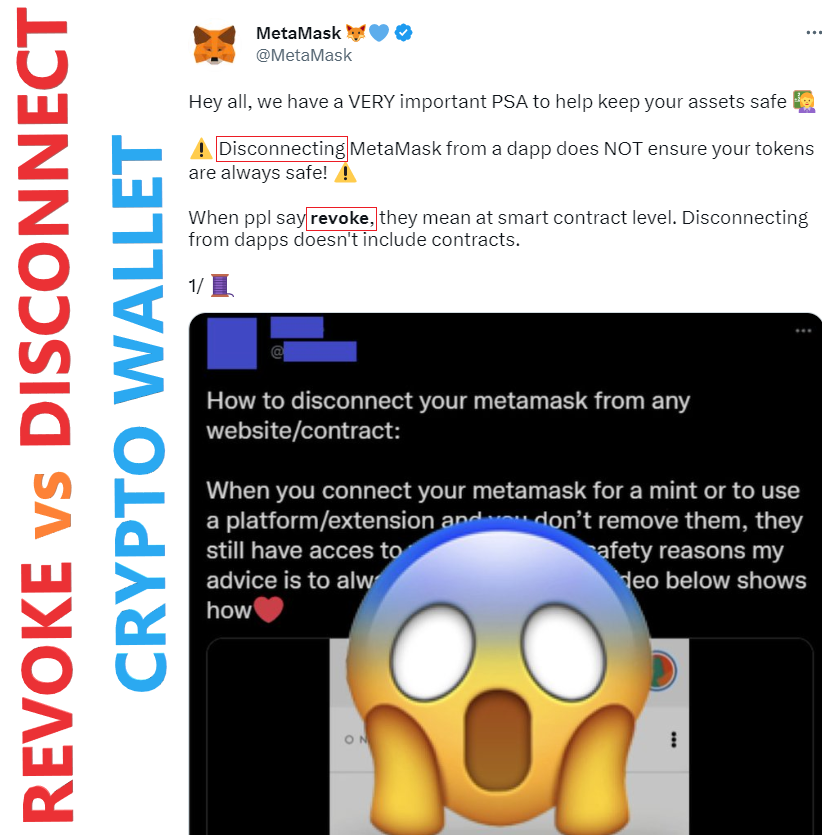
Crypto Wallet Warning!!! DON’T LOSE YOUR CRYPTO!!! Make sure you both Disconnect and Revoke, after connecting your wallet to a website/dapp.
Disconnecting your wallet from a dapp involves cancelling permission for it to see your public address and your token balances, stopping it from initiating transactions, and viewing past activity.
Revoking an approval/allowance means a dapp can no longer access the contents of your wallet and move them around — this is what everyone forgets to do, and hackers steal their crypto.
The Metamask crypto wallet team created a great article explaining how to do this (this applies to all crypto wallets, not just metamask):
https://web.archive.org/web/20231003105247/https://support.metamask.io/hc/en-us/articles/360059535551-Disconnect-wallet-from-a-dapp
Disconnect wallet from a dapp
Disconnecting vs. revoking approvals: not the same thing
Following the steps below will only disconnect your wallet from the dapp. Depending on what it originally requested, this will prevent it from viewing your public address, wallet contents, transaction history, and even the ability to initiate transactions.
It will not revoke any token approvals that you have in place with that dapp, meaning that even if you disconnect the dapp, it may still be able to access and move your tokens. For more information on revoking approvals, see this article, or our Twitter thread.
https://support.metamask.io/hc/en-us/articles/4446106184731
How to revoke smart contract allowances/token approvals
Revoking approvals vs. disconnecting apps: what’s the difference?
It’s easy to confuse these two processes, but they are fundamentally different:
Disconnecting your wallet from a dapp involves cancelling permission for it to see your public address and your token balances, and, depending on what you originally consented to, stopping it from initiating transactions (although not executing them) and viewing past activity. See our article for more info.
Revoking an approval/allowance means a dapp can no longer access the contents of your wallet and move them around
How do I revoke approvals?
The good news is there are several ways to keep track of your existing approvals and easily revoke them:
Head to the ‘approval checker’ section of the block explorer for the network you’re using. For example, Etherscan, BscScan and Polygonscan all have a token approval checker function.
https://etherscan.io/tokenapprovalchecker
https://bscscan.com/tokenapprovalchecker
https://polygonscan.com/tokenapprovalchecker
Use a platform such as:
Revoke (Ethereum mainnet) — https://revoke.cash/
Unrekt (multiple networks) https://app.unrekt.net/
approved.zone (Ethereum mainnet) https://approved.zone/
Cointool (multiple networks) https://ct.app/dashboard
Note: Cointool moved from CoinTool.app to CT.app
beefy.finance (BSC/BNB Smart Chain) https://allowance.beefy.finance/
EverRevoke (multiple networks). https://everrise.com/everrevoke/
Gas fees – Since token approvals are conducted on-chain, revoking the approval must also be on-chain. This means you need to pay gas fees for each revocation.
https://twitter.com/MetaMask/status/1499848000549515265
Hey all, we have a VERY important PSA to help keep your assets safe
— MetaMask.eth (@MetaMask) March 4, 2022
Disconnecting MetaMask from a dapp does NOT ensure your tokens are always safe!
When ppl say revoke, they mean at smart contract level. Disconnecting from dapps doesn't include contracts.
1/ pic.twitter.com/9upseGjfvl
https://support.metamask.io/hc/en-us/articles/6174898326683
What is a token approval?
https://alphasec.io/check-your-token-approvals-using-etherscan/
Check Your Token Approvals using Etherscan
A brief on Ethereum token approvals, and why you should clean them regularly.
https://web.archive.org/web/20230115193554/https://support.ledger.com/hc/en-us/articles/8700644160925-How-to-revoke-token-approvals-and-permissions-of-a-smart-contract-on-Ethereum?docs=true
Ledger — HOW TO REVOKE TOKEN APPROVALS AND PERMISSIONS OF A SMART CONTRACT ON ETHEREUM
Here’s a good YouTube video I found that explains all this: https://youtu.be/dCMq9MBevjU
 Prophetic Money
Thank you.
you’re very welcome. God Bless!